RDP Business Group
Your own ordering and delivery system, with your brand, your operation, and your customer relationship — no commission on sales.
From order to delivery
Illustrative images. The app screens in the images are examples, as are the values shown.
You invest in product, service, and marketing to win a customer. Then, at the moment of purchase, you often send that same customer to a marketplace where they find your competitors side by side.
With Aplicatix, the order happens directly with your brand.
No need to raise your prices by up to 30% to cover the marketplace's commission — your customer saves, and you sell more.
You keep the customer relationship, control your own promotions, build your own loyalty program, and turn every order into a chance to bring that customer back.
No commission on sales. No competing for attention with other restaurants. No handing your customer relationship over to a third party.
Your channel. Your customers. Your margin.
Take orders through your own platform, with your brand and your domain. Put your store link in your Instagram and Facebook bio and receive orders directly, with no commission.
Instead of giving up a percentage of every sale, work with a predictable monthly fee.
A loyalty program, SMS, and reviews help turn buyers into repeat customers. WhatsApp and campaigns: coming soon.
Ordering, kitchen, picking, inventory, pickup, and delivery all work within the same flow.
The dashboard, inside
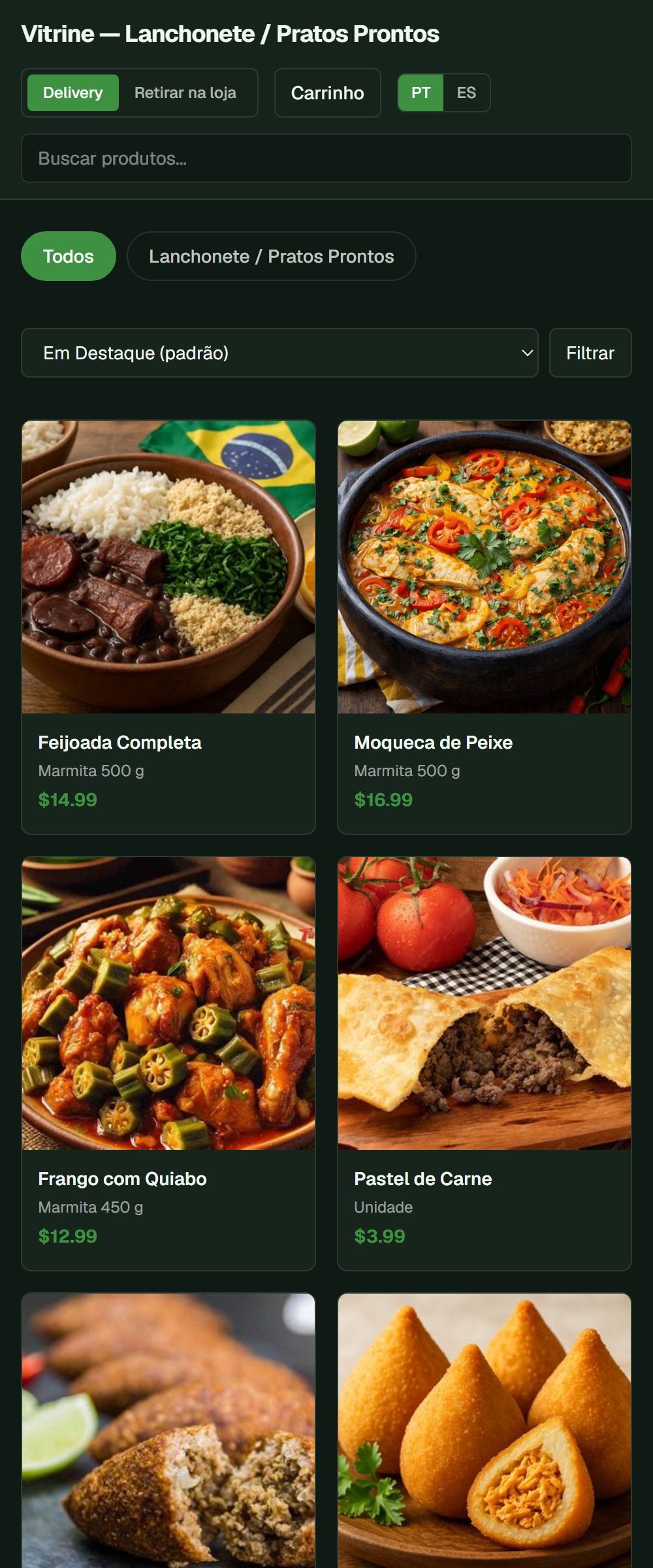
Your store, with your brand: photos, prices and a choice between delivery and pickup. The order goes straight to your dashboard.
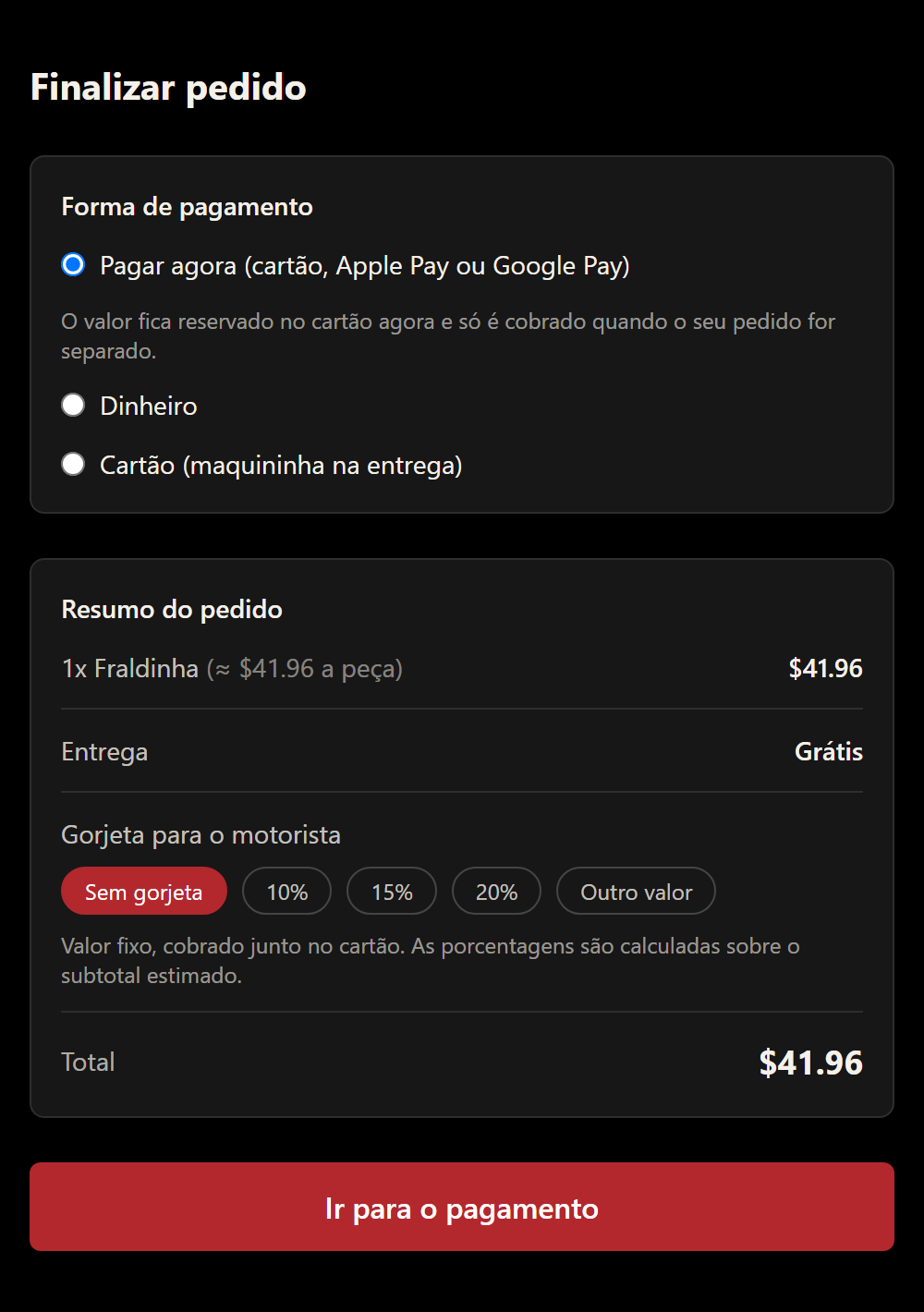
Card, Apple Pay or Google Pay. The amount is held on the card and only charged when the order is picked. The customer can also tip the driver. No commission or markup from Aplicatix.
From the Volume plan · example checkout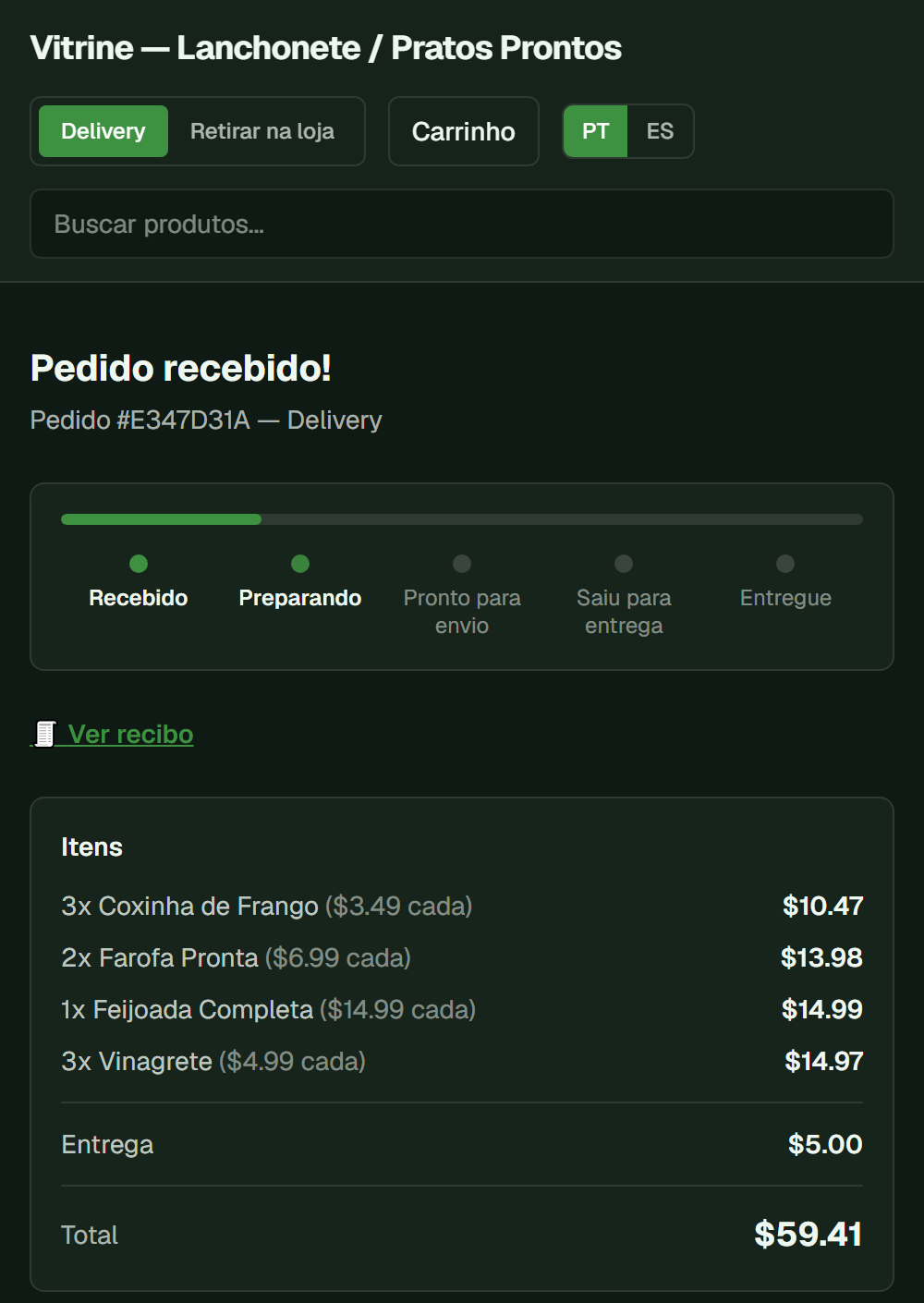
The order link shows the live stage, the items and the total. Fewer calls asking “has it left yet?”.
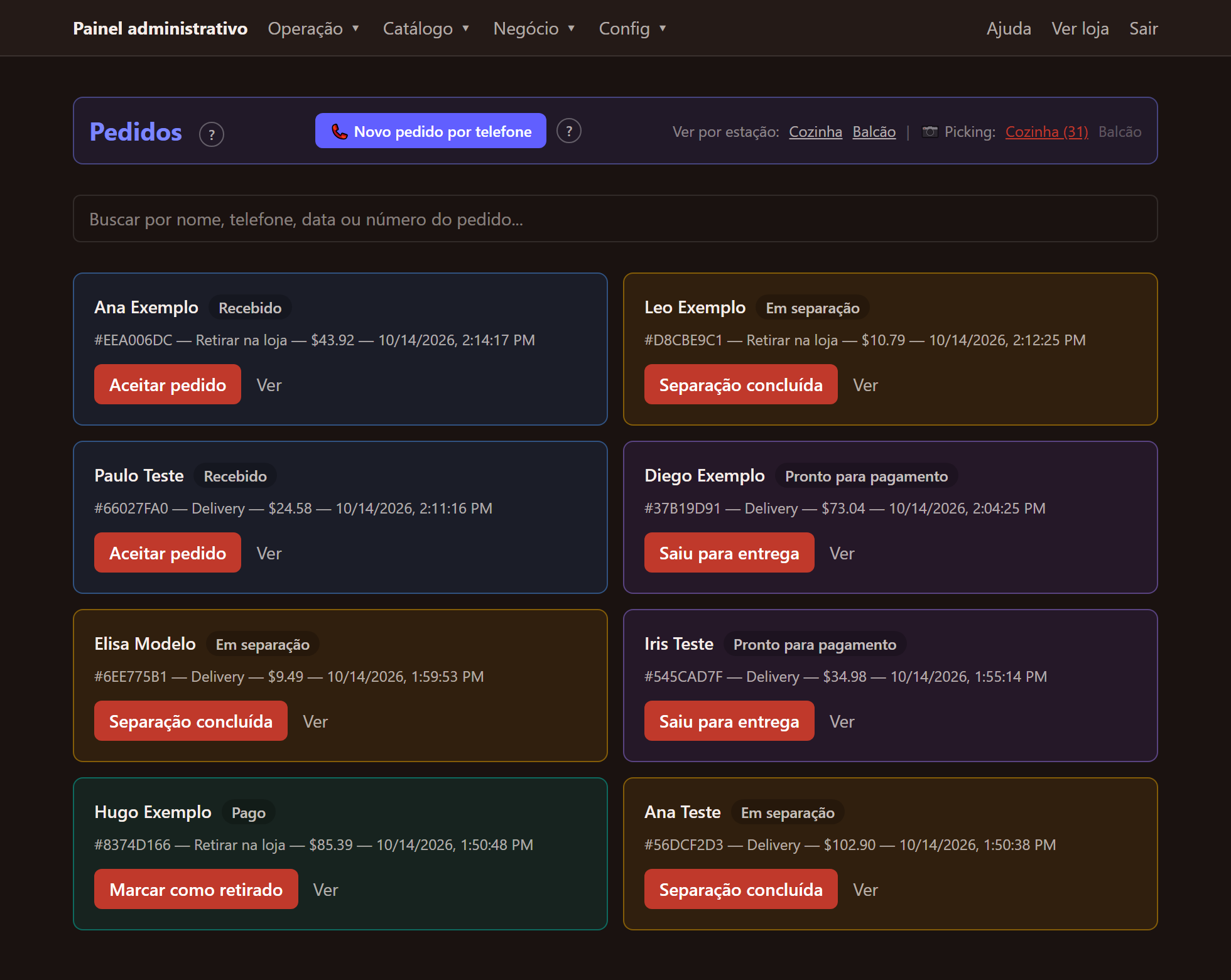
All orders on one screen, color-coded by stage with the next step one tap away: accept, picking done, out for delivery, picked up.
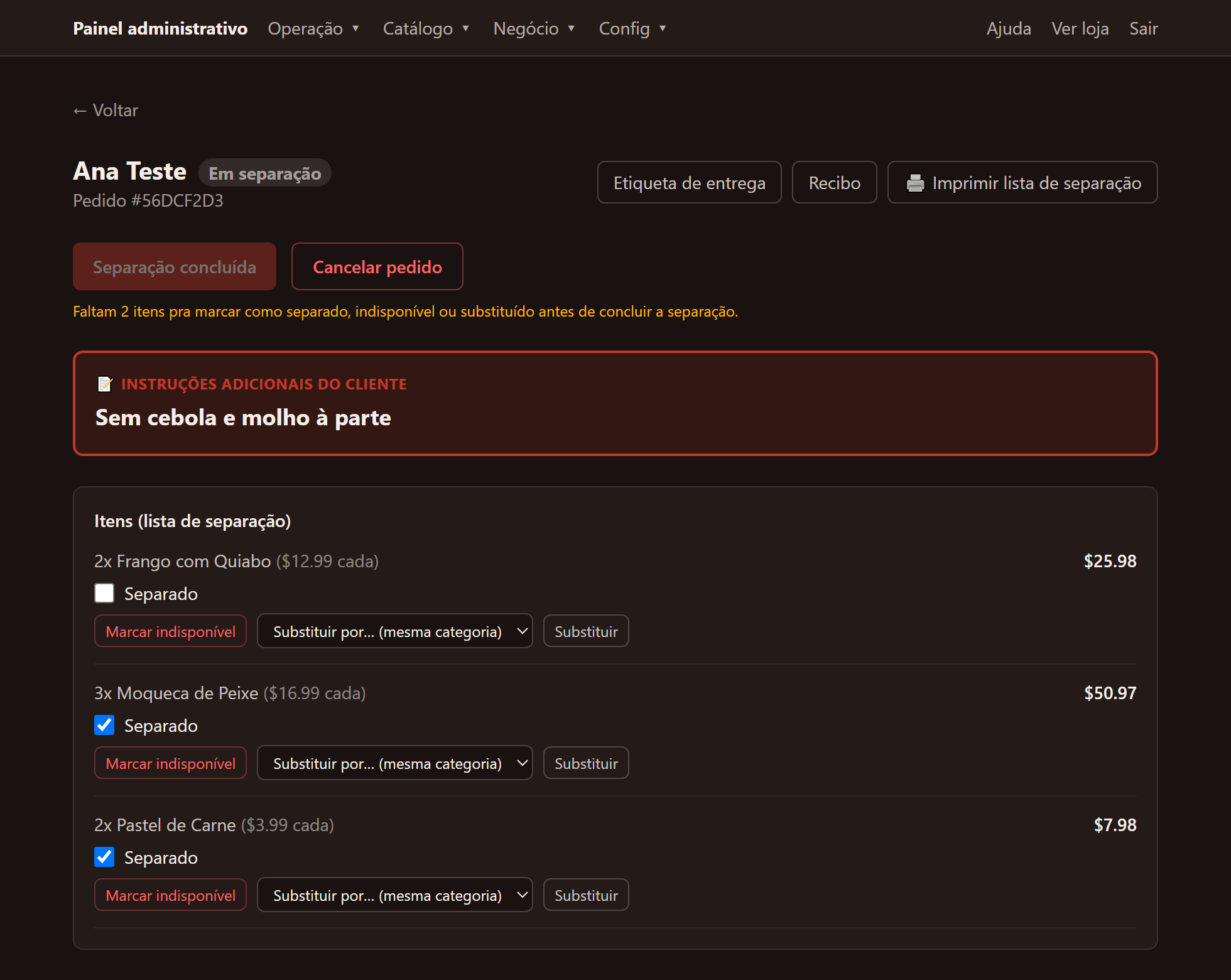
The customer's note is highlighted. Each item is checked and, if something's missing, you swap it for another in the same category with one click.
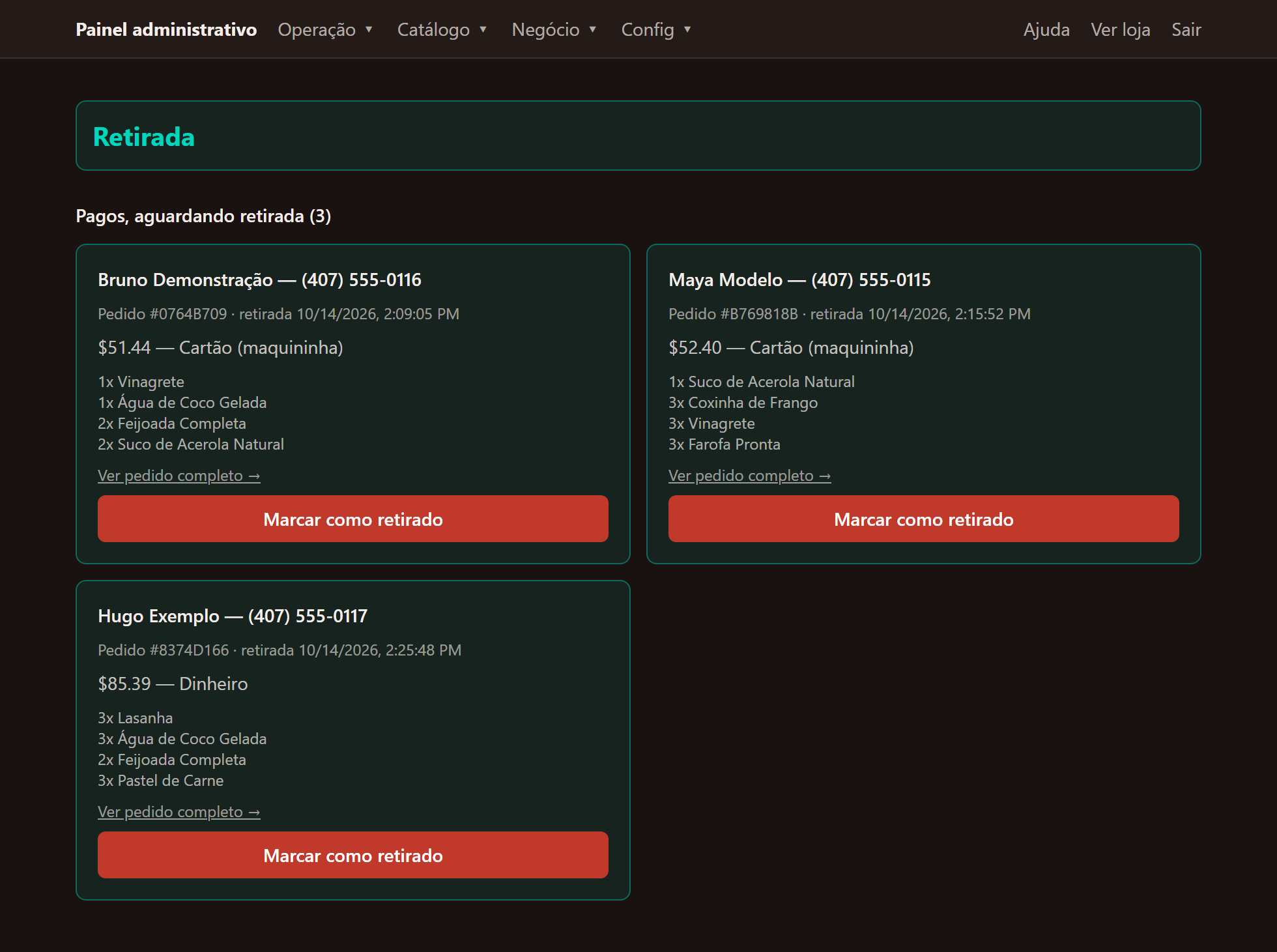
Who's coming, what they ordered and how they paid. Mark as picked up with one tap.
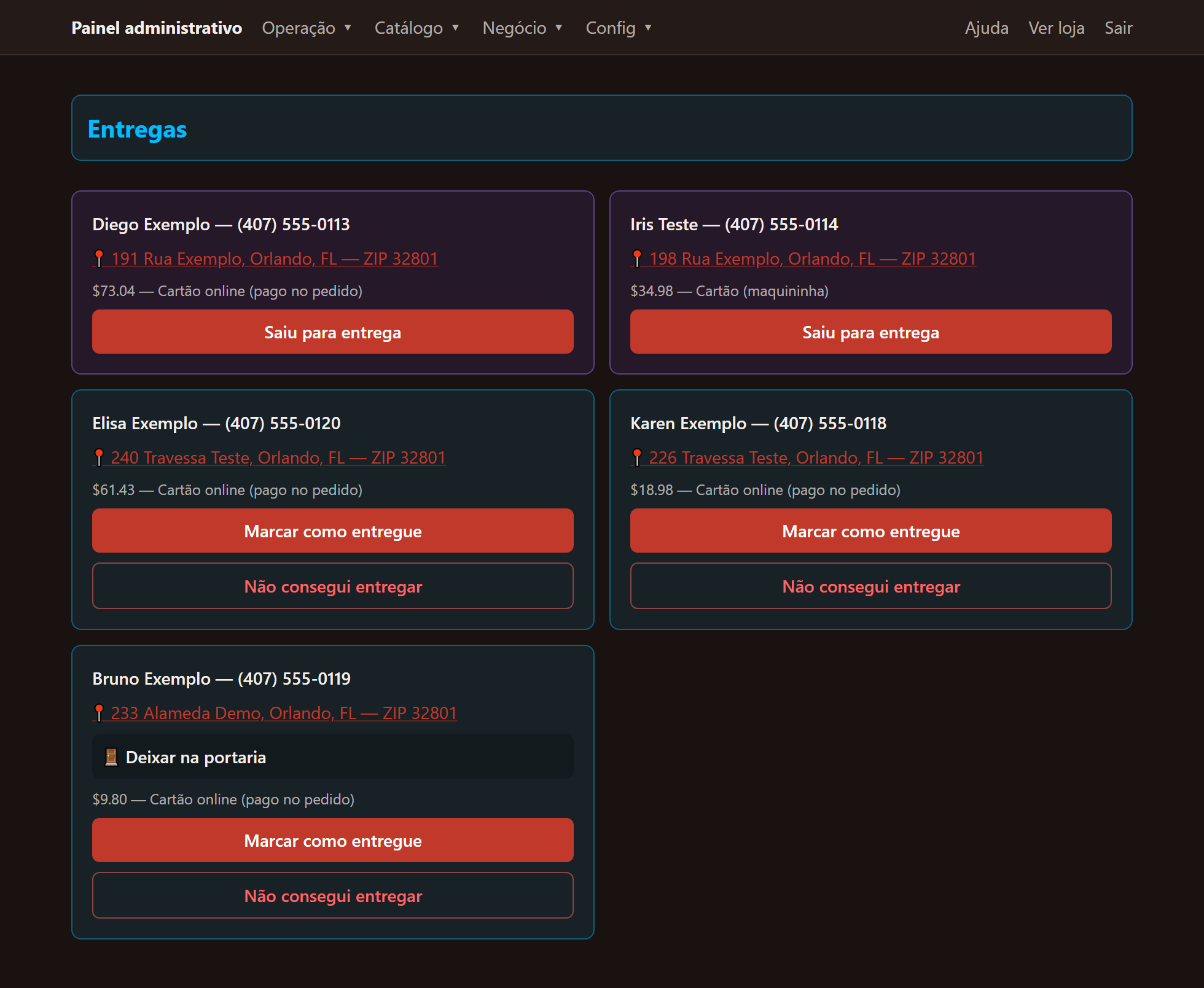
Address with a direct map link, customer note and payment method. The driver marks it delivered — or reports they couldn't.
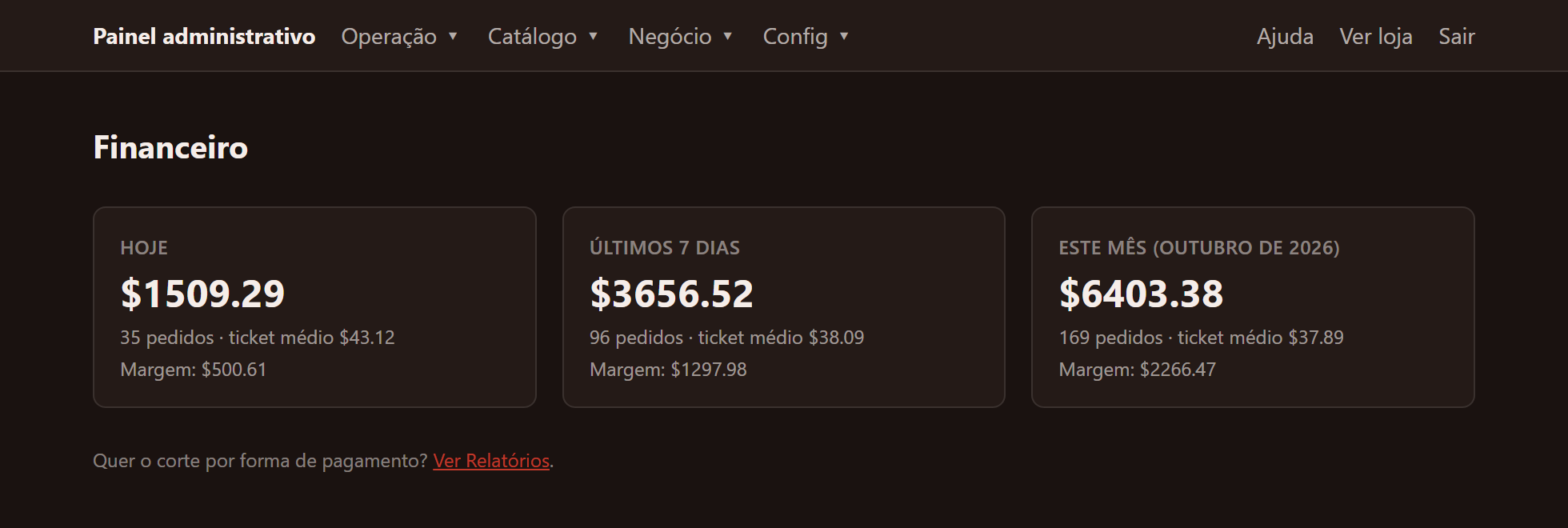
Today, last 7 days and the month: sales, orders, average ticket and margin (margin shows for items with a registered cost).
Total plan only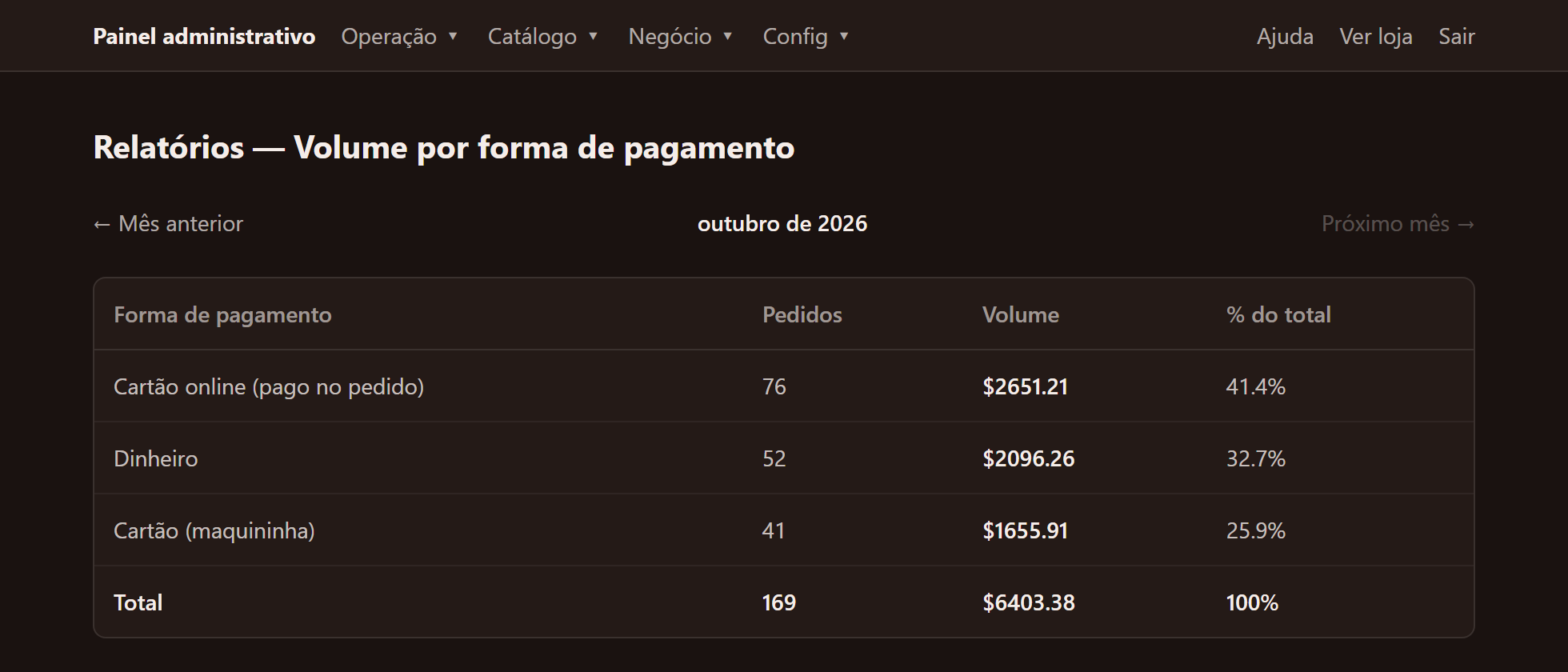
Orders and volume by payment method, month by month. Export everything to Excel whenever you want to double-check.
From the Standard planReal app screens from a demo store. Names, addresses, phone numbers, dishes and amounts are fictitious.
What's included
From the customer's order to the kitchen, no spreadsheets, no notebooks, no separate app for every step.
Your menu with photos and prices — customers order from their phone, delivery or pickup, the way you already operate. Seasonal highlights draw attention to what you want to sell more of.
Orders land straight on the screen of whoever's cooking, sorted by station — no printing, no shouting tickets.
Products, categories, inventory, staff accounts — you manage everything, and decide who on your team sees what. Each plan's account limit is enforced automatically by the system, and every order shows whether it's been paid.
A text with a link goes out the moment the order is received — your customer follows along online, no need to call and ask, with a progress bar showing exactly what stage it's at. One more text lands when it's time to act: ready for pickup, or out for delivery. Texts follow the order's language (Portuguese, Spanish or English).
What sells most, when it sells most, margin per product, and how your customers pay — decide with data, not gut feeling. Export it all to Excel whenever you want to double-check. Standard plan and up.
You set which ZIP codes you serve, the fee, and when delivery is free — under your control, not a generic third-party app's rules. Standard plan and up, the fee can also be distance-based: you set the driving-mile limit and the fee tiers (e.g. up to 5 mi $5, up to 8 mi $8, up to 12 mi $12), calculated from the real address and route. Customers also check by ZIP code, then by address, whether you deliver to them — in a small "Do we deliver here?" bubble that doesn't take over the screen. No delivery staff of your own? We also connect your store to partner driver platforms: we start the enrollment with the platform, the review and documents come directly from them, and fees are set directly with them — no commission to Aplicatix.
Way beyond online ordering
Inventory, production, special orders, and loyalty — all inside the same platform, no separate system needed.
A points program with the rules set by you — points per amount spent, redemption value, minimum balance, and expiration; once set, the rule is locked. Customers earn points by phone number, no extra app to download, and the right link to review you on Google shows up at the right moment. Volume plan and up. Point redemption by the customer: coming soon.
Your customer pays by card, Apple Pay, or Google Pay — a fast, few-taps checkout that's much more convenient for the buyer — and the order only enters your operation after the payment is approved. The money goes straight to your own store's account with the payment processor: Aplicatix never touches your money. You create and maintain your processor account and pay the processor's fees directly to it. Aplicatix charges no commission or markup on payments. Volume plan and up. Without this feature, the store keeps taking payment on delivery or at pickup.
For grocery and butcher shops: the price per pound and each piece's weight range generate an estimate for the customer, and your team enters the real weight during picking — with a check against typing mistakes. With online payment (Volume plan), the card is held with a buffer (15% margin) and only the real amount is charged, after picking and weighing; whatever's left of the hold is released.
Lunch, Dinner, Sushi… each menu with its own days and time window. Outside the window, the item shows greyed out with "back at…". The end time is the cutoff to place the order — delivery or pickup can happen later. Total plan.
Know when a product is running low — customers see "almost gone" on the storefront, and you get an SMS before it actually runs out. Volume plan and up, operational alerts for stuck orders and long queues land the same way, right on your phone.
Made fresh daily? Release the day's available quantity and the system resets itself tomorrow — never sell yesterday's batch. Standard plan and up, save production lists to reuse instead of building them from scratch every day.
Missing an item? Swap it for another in the same category with one click. Customer instructions show up highlighted during picking, the picking label prints on the spot — and the delivery label comes separately, already with the address, an access code, and a QR code that opens straight into Google Maps. Volume plan and up, your phone's camera scans the barcode and marks the item as picked (for weighed items, the weight is still typed in).
Party, event, big order — its own page for special requests, with date, guest count, and details, without turning into a mess on WhatsApp. Event deposit paid through a payment link, confirmed automatically: coming soon. Standard plan and up.
One QR for the whole menu, or one per category — on the table, on the display case, wherever it makes sense. Price changed? Update it in the system and you're done, no reprinting. Volume plan and up.
Problem with a delivery? There's a dedicated flow: returned items go back to inventory or are discarded depending on the category, the refund accounts for the retained fee, and the driver is paid for the return leg. Cancelling or refunding is blocked while the driver is on the road, every refund requires a reason from the standard list, and the customer is notified by SMS. And "Last order" stops accepting the day's orders in the final minutes before closing.
The attendant shows a QR code; the customer pays on their phone — Apple Pay, Google Pay, or card — and the order becomes "Paid" on its own. The money goes straight to the store's account with the payment processor. With online card payment there's also tipping: on delivery it goes to the driver, on pickup to the team. Volume plan and up, with online payment active and an approved payment processor.
Cash with change: the cashier types in the amount received, sees the change, and everything is logged. The Pickup screen separates the "awaiting payment" queue from the "paid, awaiting pickup" queue, and each person sees their own. The receipt shows items, weights, and card, on screen and on an 80 mm thermal printout. On every plan.
Each area does only its own step, and cancelling requires a manager or owner. With the package check (1/3, 2/3, 3/3), an order with items from several areas is only charged and handed over once all packages are checked — you switch it on or off whenever you like, under Notifications. On every plan.
Sounds for new orders, excessive wait times, pile-ups, and stalled deliveries. The dashboard opens full screen on an iPad or tablet, with your store's icon. On every plan.
Customer called? The manager enters the order in the system and it lands in the same queue as the kitchen, the Register, and deliveries. No paper. On every plan.
Send the order link by WhatsApp or SMS from your own device and get paid by card. The order is then marked as paid. Card by link: Volume plan and up.
You choose whether to accept cash and card terminal at pickup and delivery, and whether the kitchen only starts after payment.
FAQs, step-by-step guides, and a checklist show what's left for the store to be ready, in Portuguese, Spanish and English.
After an order is completed, the customer's page invites them to review the store on Google. You turn it on or off whenever you like.
Each store's site already tells Google its name, address, phone, hours, and that it takes online orders. Ranking in the results is up to Google and there's no guarantee; the guide in the help center shows you how to set up your Business Profile, for free.
Automated chatbot replies over SMS (WhatsApp: coming soon) for simple questions and order status — your team focuses on what only a human can solve. Activate as your operation grows. No date set.
Orders and SMS from the last 6 months, right in your dashboard — track your own usage without asking us for a report.
Many ordering apps take a cut of every sale you make. Not here — the monthly fee includes a number of orders each month. If you go over it, each additional order pays a small, fixed usage fee that doesn't depend on the sale amount. The more you sell, the more stays with you.
| Third-party marketplace | Aplicatix |
|---|---|
| Customer buys inside their platform | Customer buys directly from you |
| Competitors appear in the same environment | Your brand is the focus |
| Commission tracks your sales | Predictable monthly fee + a flat fee per extra order, no commission |
| Relationship depends on the platform | You build your own customer base |
| Marketing happens inside the marketplace | Your own loyalty program and messaging |
| Fragmented operation | Ordering, KDS, inventory, and delivery connected |
Plans
Switch plans whenever your operation grows.
| In each plan | Starter | Standard | Volume | Total |
|---|---|---|---|---|
| Monthly fee | $149 | $249 | $459 | $713 |
| Orders included per month | 300 | 1,200 | 2,500 | 4,000 |
| Additional order (usage fee) | $0.25 | $0.20 | $0.17 | $0.14 |
| Status SMS included* | 600 | 2,400 | 5,000 | 8,000 |
| Staff accounts (owner and managers) | 3 | 5 | 8 | 15 |
| Active menu items | 100 | 500 | 3,000 | 7,000 |
No order is blocked for going over what's included: it comes in normally and pays the usage fee for the additional order, shown above. We don't charge commission on your sales. The item and account limits only prevent creating new ones beyond the plan; what already exists keeps working. Payment processor fees, when you get paid by card, are charged separately by the processor itself, directly to you — Aplicatix does not receive any share of those fees.
| Features by plan | Starter | Standard | Volume | Total |
|---|---|---|---|---|
| Distance-based delivery (mile radius and fee tiers) | — | ✓ | ✓ | ✓ |
| "Do we deliver here?" ZIP-code bubble | — | ✓ | ✓ | ✓ |
| Online card payment, Apple Pay and Google Pay‡ | — | — | ✓ | ✓ |
| Card payment at the counter via QR‡ | — | — | ✓ | ✓ |
| Card tipping‡ | — | — | ✓ | ✓ |
| Loyalty (points program) | — | — | ✓ | ✓ |
| Phone-camera picking | — | — | ✓ | ✓ |
| Schedule-based menus (Lunch, Dinner…) | — | — | — | ✓ |
| Automatic alert at 80% of each limit | ✓ | ✓ | ✓ | ✓ |
| Card payment by link and waiting for payment before production‡ | — | — | ✓ | ✓ |
| Interface in Portuguese, Spanish and English | ✓ | ✓ | ✓ | ✓ |
On every plan: ZIP-code delivery with a flat fee, payment on delivery or at pickup, picking from the order screen, weighed items, labels, order reopening, cash with change, Pickup screen, per-step permissions, package check, sound alerts, installable dashboard, receipts, phone orders, interface in Portuguese, Spanish and English, SMS in Portuguese, Spanish and English, support in Portuguese, Spanish and English, and "Last order".
* SMS depends on the carrier's Toll-Free/10DLC approval for each store's number, based on your business's documentation — an external step we don't control. WhatsApp, when available, will depend on Meta approval (WABA). Without approval, or without the required documentation, your business works normally, just without that notification channel active; this doesn't generate a discount, credit, or reduction on the monthly fee.
† Subject to technical feasibility and RDP's approval, as long as they don't affect performance or the platform's existing structure.
‡ Online payment: the store creates and maintains its own account with the payment processor (identity, business, and bank details) and pays the processor's fees directly to it; the money goes straight to the store's account, without passing through RDP, and Aplicatix charges no commission or markup on payments. Apple Pay requires registering the store's domain. Counter QR payment and tipping depend on online payment being active and the payment processor being approved.
Each message sent counts as 1 SMS on the plan; long messages may use more than one carrier segment.
Common questions
No. The monthly fee includes a number of orders per month. If you go over it, each additional order pays a small, fixed usage fee that doesn't depend on the sale amount.
Nothing for your customer: the order comes in normally. You pay the usage fee for the additional order on that month's invoice and track everything in "My plan". If it keeps happening, it's worth talking about a bigger plan.
The dashboard alerts you when you reach 80% of your orders, SMS, items, or accounts, and shows the month's usage in "My plan".
You can't add or reactivate more items, or create more accounts, until you free up a spot or switch plans. Nothing that already exists is hidden or deleted.
No. Only the active product on the menu counts.
An extra pack kicks in, billed on the invoice. If that runs out too, SMS notifications to the customer are paused until the following month. Orders continue as normal.
Do the math
Enter your average order value and see how many sales already cover the plan — the rest of the month is profit on top of the platform.
How to get started
Covers initial setup and registering your SMS number — done once, not repeated. If you don't have your own domain yet, we register it for you: the work is included in the Activation Fee, the domain is registered in your name, and the domain cost is not included (renewal, from the second year on, is paid by you). Subject to name availability. Can be split into up to 3 payments alongside your first monthly bills, if you prefer.
We connect your WhatsApp Business to your marketing and order-status flow with two paid, optional add-ons available on any plan: status updates via WhatsApp (starting at $19/mo) and WhatsApp campaigns to send promotions to your customer list (starting at $69/mo, you write the content). Still in development with no date set, and subject to Meta approval (WABA), your business's documentation, Meta's rules and any applicable fees, and your customers' opt-in. No plan includes WhatsApp.
The Activation Fee covers turning on the SMS channel — recommended for almost every business, but not required. If your operation doesn't need it, or you already have your own domain, talk to us and we'll adjust the price to your case.
Keeping your own domain active costs $40/year (registration + auto-renewal handled by RDP, so you never have to remember). Already have your own domain? No charge at all — we just point it at the platform.
Need equipment for the kitchen or picking? See our recommendations →
Want to see it in action before deciding? Check out our live demos →
Questions about limits, items, accounts, or SMS? See the support page →
Every operation is different — tell me how yours runs and I'll show you exactly where the platform fits in.
Chat on WhatsApp(407) 305-0123 · or email us at info@aplicatix.com